Introduction to Distributed Computing
202401111212
Status: #idea
Tags: DC
Introduction to Distributed Computing
- Follow the TB - Slides are for teaching only
- Open book - Laptop not allowed. Printouts are allowed.
- Course is focused on infrastructure on which distributed applications run
Types of Systems
- Centralised
- Decentralised
- Networked computer system in which processes and resources are necessarily (out of necessity) spread across multiple computers
- Not designed from the ground up for distribution
- Forced to integrate systems separated by administrative boundries
- FL
- Blockchain - No trust
- Monitoring and traffic control - Forced to spread due to spatial requirements
- Eg: Financial services, federated learning, blockchain
- Distributed
- Same but sufficiently (not necessary) spread...
- Adding nodes for scalability, performance, fault tolerance, availability, security (possibly on demand)
- We expand a system: Not adding functionality, but adding servers for scale
- Gmail: Have only IMAP and SMTP, but need more than 2 servers due to sheer number of users
- CDN (Akamai)
- NAS: Like Netflix storing its data
- Two ways to
- Integration
- Expansion
Are centralised solutions bad?
- Misconception: Centralised solutions do NOT scale
- DNS: Logically centralised but physically many servers for replication
- Misconception: Centralised solutions have a single point of failure
- DNS root is replicated
- SPoF is easier to mange. Can be hardened against failures and attacks
- Proven to extremely scalable and robust
- Cloud-based solutions could be centralised
Decentralisation is NOT a goal in itself.
If you have a choice, go for a centralised system.
Different perspectives
- Architecture - Styles, organisations
- Processes - Threads, virtualisation, containers
- Communication - Facilities for exchanging data
- Process coordination - How to ensure consistency?
- Naming - How to identify resources?
- Consistency and replication techniques
- Fault tolerance
- Security - Mostly will NOT be touched
Goals that you should meet to consider a distributed system
- Sharing of resources
- Make it easy for the user and applications to share resources
- Why? Cost-effective
- Distribution transparency
- The system should hide the fact that the resources are distributed
- The distribution should be transparent to the user
- Openness
- Easy to use and integrate with other systems
- Scalability
- Technique by which it transparently adds resources to maintain same level of performance/latency even when number of requests/users increases.
- Security and dependability - NOT goals, but is essential
Sharing of Resources
- Groupware
- Google docs - Collaborative editing
- Teleconferencing - Zoom, MS Teams, GMeet, etc.
- Multimedia file sharing - P2P assisted BitTorrent
- Outsourced email systems - Like Gmail
- CDNs
Distribution Transparency
ADD PIC from SLIDE 11
ADD TAABLE from slide 11
| Type of Transparency | Description |
|---|---|
| Access | Hide differences in data representation and how an object is accessed. Ex: RPC call |
| Location | Hide where the object is located Ex: URL |
| Relocation | Hide that an object may be moved to another location while in use Ex: VM migration (on cloud) |
| Migration | Hide that an object may move to another location Ex: VM migration, mobile internet (servers do not know about your physical movement) |
| Replication | Hide that an object is replicated |
| Concurrency | Hide that an object may be shared by several independant users |
| Failure | Hide the failure and recovery of an objeect |
HashTable in Java is thread-safe. Multiple threads can access it concurrently. It internally uses a lock to ensure consistency.
How much transparency?
- Distribution transparency is a nice goal, but achieving it is impractical
- Often, it should not even be aimed at
You can not distinguish between a slow computer and a crashed one (proof of CAP theorem)
ADD TABLE (Slide 12)
| You can't hide communication latency |
Researchers are arguing that knowing the distribution, and then using explicit message passing.
If reliability cannot be guaranteed, it is better to do local executions. Copy data before it is used, to the intended recipient. Only after copying, access the data.
Alternative idea: Never update. Create a new version of the data
Scaling
- Add more users/processes (size scalability)
- Compute
- Formal analysis is possible
- A centralised service can be modelled as a simple queuing system
Scaling up -> Adding more CPUs
Scaling out -> TODO
- Geographical scalability
- Adding nodes in different geographical locations
- If a user near you and far from you get the same response time, then it is geographically scalable
- Problem
- WAN is inherently unreliable. So, we cannot use a simple client-server model anymore
- Administrative scalability
- No matter which administrative zone the request goes to, the response time must be the same
- Problems
- Conflicting policies concerning usage (and payment), management, security, etc.
- Eg. Using Netflix in different countries. Can't see the same content
- Counterexamples
- BitTorrent
- Skype
- Conflicting policies concerning usage (and payment), management, security, etc.
Scaling Techniques
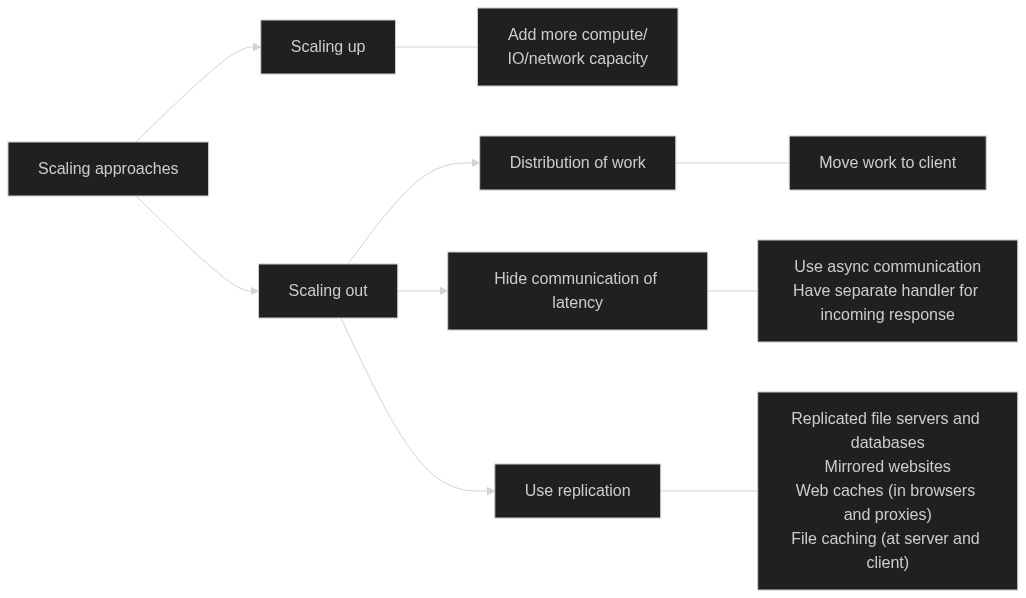
- Replication -> CDNs
Dependability
-
Availability
- Software is crashing, but it comes back, so it is available
- Eg.
-
Reliability
- Service will continue to
- Eg. Mars rover when landing needs to be reliable. Availability is secondary
-
Safety -> Resilient against attacks
-
Maintainability -> How fast a failed system can be recovered
-
Traditional metrics
- Mean Time To Failure (MTTF)
- Mean Time To Repair (MTTR)
- Mean Time Between Failures (MTBF) = MTTF + MTTR
Securtiy
- Confidentiality -> Information is only disclosed to authorised parties
- Integrity -> Ensure alterations to the assets of a system can only be made in an authorized way
- Authentication -> Verifying the correctness of a claimed identity
- Authorisation -> Does an identified entry have access rights?
- Trust -> One can expect that another will perform particular actions according to a specific expectation